Microsoft Fabric Governance, Part 6: Assessing Impact Before Making Changes
Replacing a measure or retiring a semantic model can affect reports beyond its workspace. The final part shows how impact analysis identifies potentially affected items — and why the change itself still needs validating.
Key takeaways
- Impact analysis extends lineage beyond the workspace, showing direct children or all downstream items, by type or by workspace.
- A dependency signals potential impact, not proof that a report uses the measure you’re changing. Validate the change itself.
- “Limited access” isn’t low impact. Coordinate with owners, and run impact review before changes, not after problems.
Replacing a measure or retiring a semantic model can affect reports beyond the workspace where the change begins.
In Part 5, we used workspace lineage to inspect the Finance solution. The next step is to focus on an individual item and investigate who may depend on it.
Fabric’s impact analysis supports that investigation. It identifies potentially affected downstream items and workspaces, including dependencies outside the current workspace.
Start with the item’s lineage
Open the Finance workspace in Lineage view and locate Finance_Performance. Select the lineage arrow at the bottom-right of its card to highlight related items and dim unrelated content.
This helps isolate the model’s relationships, but the workspace view does not display downstream items in other workspaces. Use impact analysis to extend the investigation.
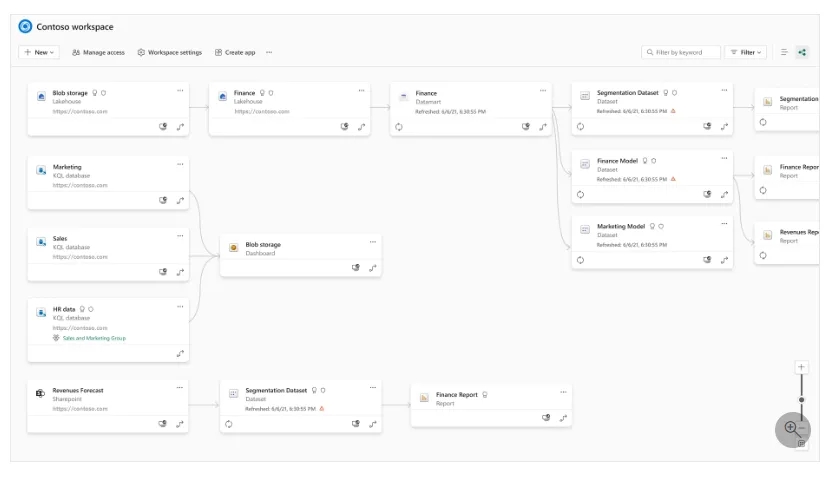
Figure 1. Workspace lineage provides the starting point for selecting an item and investigating its relationships. Image: Microsoft Learn.
Look beyond the workspace
Impact analysis lets you review direct children or all downstream dependencies and group the results by item type or workspace. For data sources, only direct children are shown.
You need write permission on the item to open its impact analysis. Names are visible only for items and workspaces you can access; other dependencies appear as Limited access.
In our extended Finance example, Finance_Performance might support both Finance_Management and a dependent forecasting model in another workspace. That forecasting model could, in turn, support its own report.
The distinction matters: direct children identify immediate consumers; all downstream includes indirect dependencies.
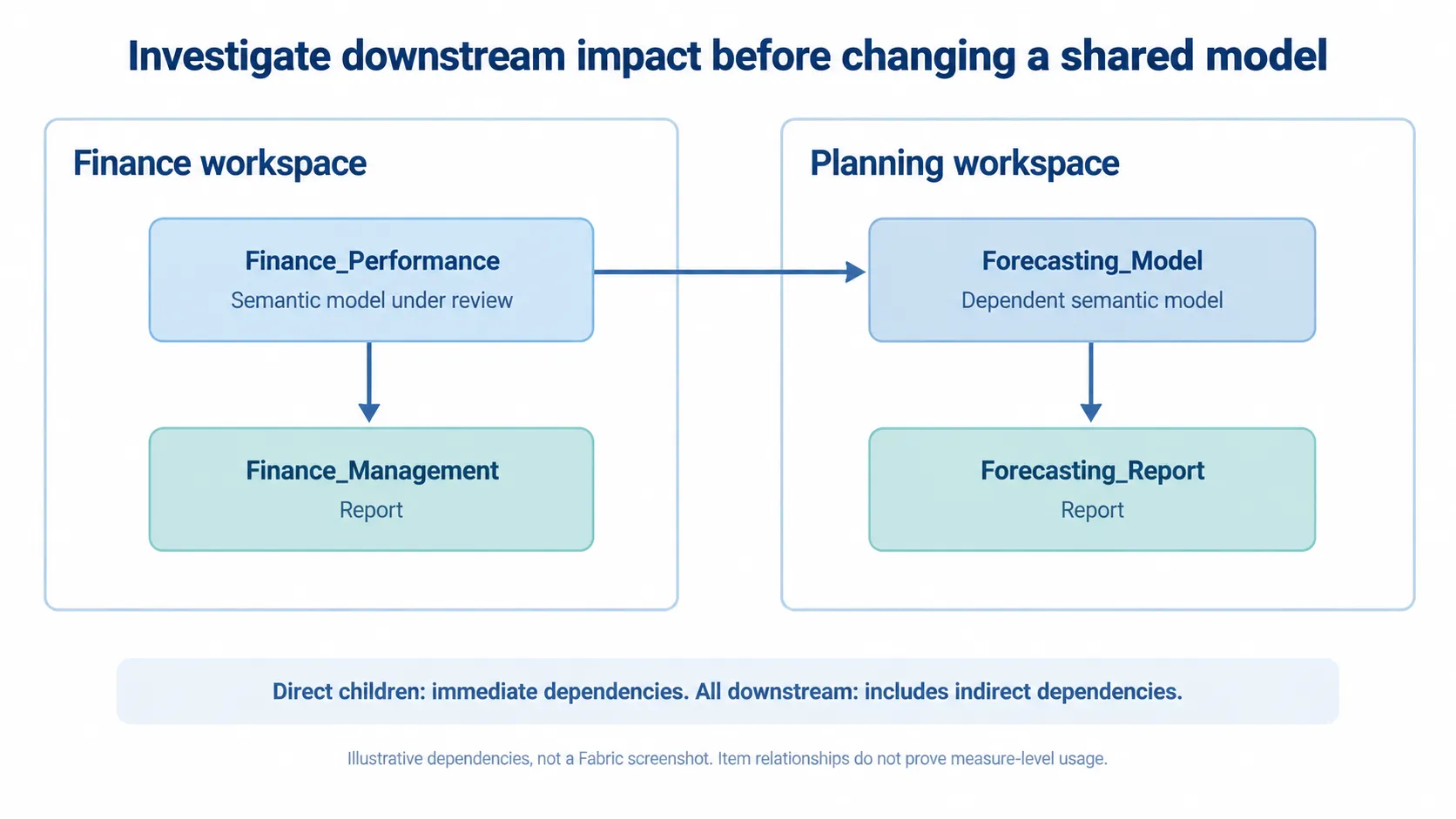
Figure 2. Direct and indirect dependencies across the Finance and Planning workspaces. An illustrative design, not a Fabric screenshot or evidence of actual measure usage.
Review a proposed Finance change
Suppose Finance plans to replace an outdated operating-margin measure.
- Locate Finance_Performance in workspace lineage.
- Open Impact analysis from the item’s card.
- Review direct children, then all downstream items.
- Group by workspace to identify affected teams.
- Confirm the relevant owners, validation tasks and release arrangements.
The pane also provides Notify contacts, which sends a message to the contact lists of affected workspaces. It does not necessarily reach every report owner or consumer, so use it alongside the agreed change process.
Validate the change — not just the connection
A downstream dependency indicates potential impact. It does not establish whether a report uses the particular measure being changed.
For Finance_Performance, review the affected reports and collect evidence proportionate to the change:
| Review area | Example evidence |
|---|---|
| Calculation accuracy | Before-and-after reconciliation for representative periods |
| Report behaviour | Checks of affected visuals, filters and totals |
| Business acceptance | Confirmation from the responsible Finance owner |
| Recovery | A tested rollback or restoration approach |
Record the proposed change, affected consumers, validation owner and release conditions in the team’s existing change record. A separate governance document is unnecessary if the delivery process already captures this evidence.
Where dependencies appear as Limited access, coordinate with the appropriate workspace owners. Do not interpret restricted visibility as low impact. Where lineage coverage is incomplete, supplement the graph with connection, code and report reviews.
Make impact review part of delivery
Use impact analysis before deleting, replacing or materially changing shared content — not only after a problem appears.
It provides a starting point for identifying consumers. Testing establishes whether the change is safe; communication ensures affected teams are prepared.
That completes the governance cycle explored in this series: make content discoverable, communicate trust and classification, understand dependencies, and assess changes before release.
Documentation reviewed on 20 October 2026. Confirm current permissions, item support and lineage limitations before relying on the results.