Microsoft Fabric Governance, Part 1: Getting Started with OneLake Catalog
Finding Fabric content is only half the challenge; knowing which content to use is harder. Part 1 of a six-part series starts with OneLake catalog and a simple finance scenario.
Key takeaways
- OneLake catalog is the starting point for discovery, with three areas: Explore, Govern and Secure.
- Metadata helps people find content, but names, descriptions and owners don’t prove trust. Accountability still has to be agreed and documented.
- Start small: three finance items, five governance questions, and a test with a real user.
As a Fabric environment grows, finding content is only half the challenge. Knowing which content to use is harder.
A finance analyst might find several revenue models, similarly named reports and lakehouses with unclear ownership. Before using them, they need answers: What is this? Who is responsible for it? Is it suitable for my purpose?
This series explores the Fabric capabilities that help answer those questions, starting with OneLake catalog.
Our finance scenario
Throughout the series, we will use three fictional items:
| Item | Purpose |
|---|---|
| Finance_Curated lakehouse | Holds prepared finance data |
| Finance_Performance semantic model | Defines agreed financial measures |
| Finance_Management report | Presents financial performance |
The aim is straightforward: help employees find the right content, understand its status and assess dependencies before making changes.
The names alone do not establish trust. Calling a lakehouse “Curated” does not prove its quality, just as describing a measure as “agreed” does not establish who approved it.
Start with OneLake catalog
OneLake catalog provides a central experience for discovering Fabric items and accessing governance and security capabilities. Microsoft documents three areas:
- Explore: Find items and inspect their details.
- Govern: Review governance insights, recommendations and administrative controls.
- Secure: Review and manage supported access controls.
The information and actions available depend on your permissions and the capabilities supported in your environment. These areas serve different purposes; they are not three sequential governance steps.
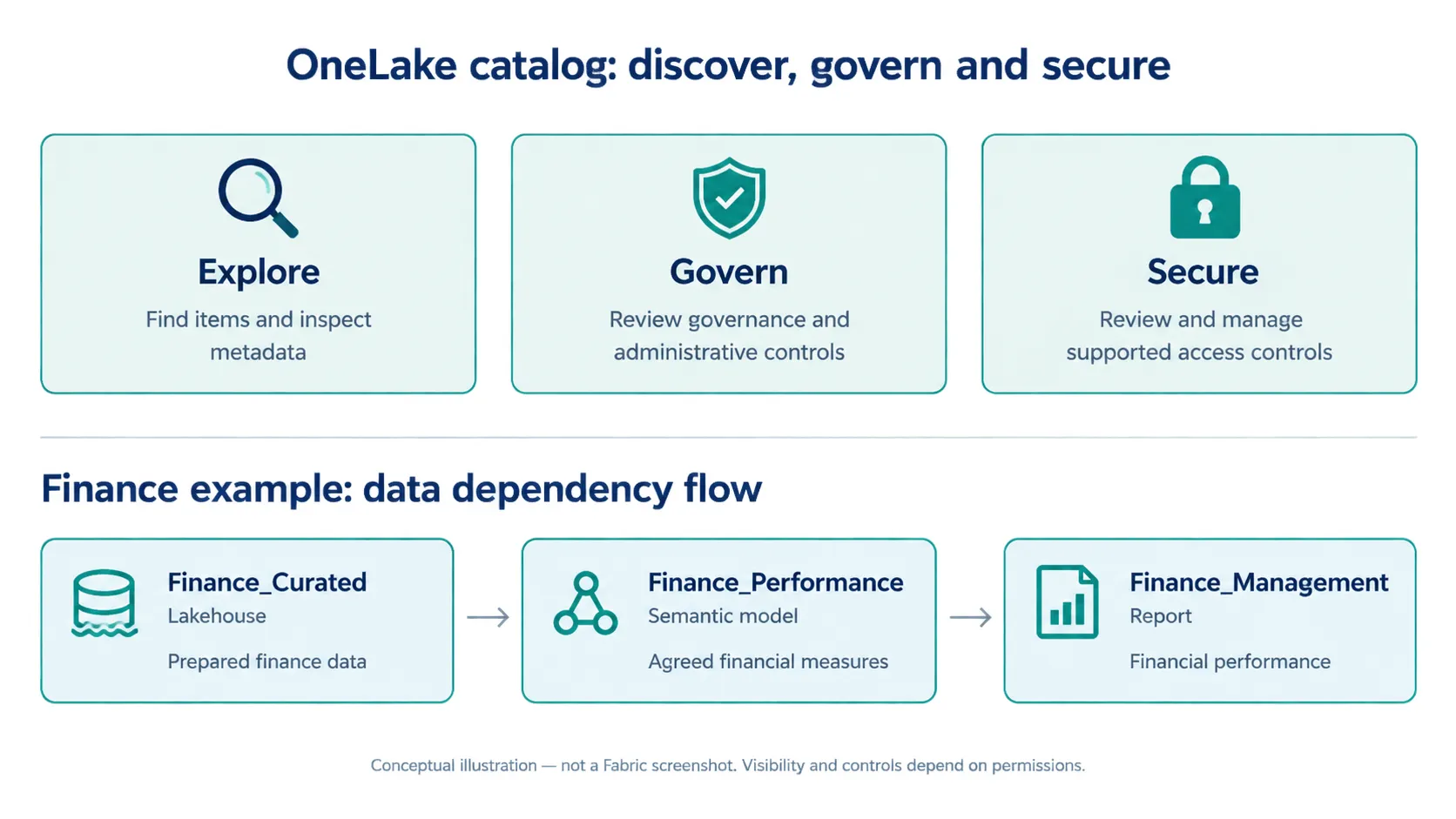
Figure 1. The three catalog areas and the finance example’s dependency chain. A conceptual illustration, not a screenshot of the Fabric interface.
A practical first walkthrough
Start with a workspace you can access and a small set of finance items.
- Open OneLake catalog from the Fabric navigation and select Explore.
- Narrow the list using filters such as workspace and item type. Tag filtering is available when tags are enabled for your organisation.
- Select Finance_Performance to inspect its details.
- Review the available description, owner, workspace, endorsement and sensitivity information.
- Follow the available options to inspect lineage or manage permissions, where your access allows.
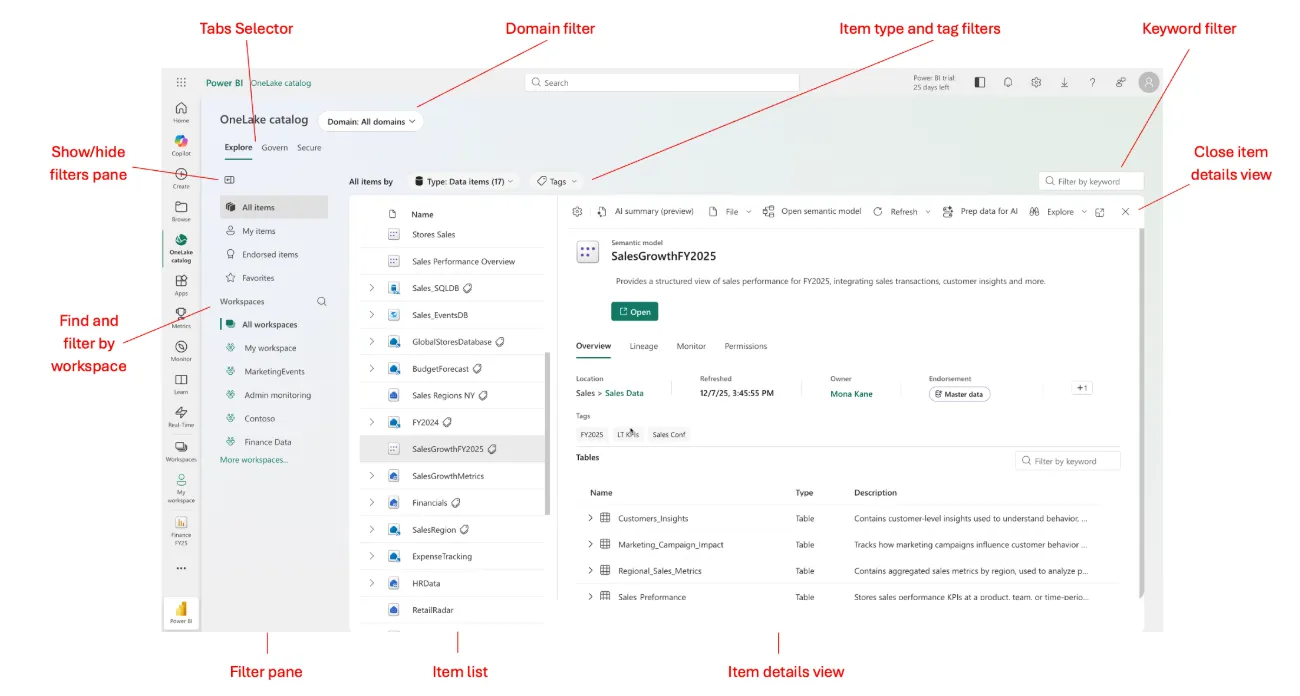
Figure 2. The main parts of the OneLake catalog Explore tab. Image: Microsoft Learn.
Treat this as an inspection, not a compliance assessment. A populated description or visible owner is useful context, but neither proves that the item is accurate or actively maintained.
Discovery and access are also separate. Certain items can be made discoverable to users who do not yet have permission to use them, such as semantic models configured as discoverable; discovering an item does not grant access to its underlying data.
Turn discovery into a governance conversation
For the Finance example, use the catalog to start five conversations:
| Question | What to establish |
|---|---|
| What is this for? | A clear purpose and intended audience |
| Who is accountable? | A business owner and a technical maintainer |
| Which version should we use? | A distinction between approved content and work in progress |
| How should it be handled? | Classification and access appropriate to its contents |
| What depends on it? | Upstream sources and downstream consumers |
Do not assume that the owner displayed in Fabric is automatically the accountable business owner. Confirm the responsibility and document it through your governance process.
Suppose two reports calculate operating margin differently. Adding descriptions will not resolve the disagreement. Finance must first agree the calculation and its owner; the semantic model and dependent reports should then reflect that decision.
Begin small and make it useful
Start with the three Finance items rather than attempting to document the entire tenant.
For each item, establish its purpose, accountable owner and review arrangements. Keep these in an agreed governance record where the catalog does not provide an appropriate field.
Then test the outcome with a user: can they identify the right model, understand its intended use and find someone to contact?
That is a more useful measure of progress than counting populated metadata fields. OneLake catalog makes information easier to find; the organisation still has to make — and maintain — the decisions behind it.
Documentation reviewed on 20 October 2026. Capabilities and interface details can change; confirm current availability and permissions in your environment.