Migrating Azure Synapse Workloads to Microsoft Fabric: Where to Start
Microsoft's guided migration tools make it easier to assess Azure Synapse workloads and move supported components to Fabric. They do not remove the need to adapt code, configure security or validate business results.
Key takeaways
- Treat each Synapse workload (Spark, pipelines, dedicated SQL pools) as a separate migration decision with its own path.
- A completed migration confirms the transfer, not production readiness. Connections, triggers and business results still need validating.
- Keep Synapse as the production path until the evidence supports cutover, and avoid both platforms writing to the same tables.
Microsoft’s guided migration tools make it easier to assess Azure Synapse workloads and move supported components to Fabric. They do not remove the need to adapt code, configure security or validate business results.
The strongest reason to start now is assessment, not an assumption that every workload should move. A representative pilot can establish compatibility, operational effort, performance and cost before a production commitment.
This article follows a sales-processing example and uses screenshots from Microsoft’s published pipeline walkthrough — not a migration performed for this article. The guided Spark and Synapse pipeline migration experiences are documented as preview.
Choose the path by workload
Synapse is not a single technology. Treat each workload as a separate migration decision.
| Existing workload | Fabric destination | Starting approach |
|---|---|---|
| Spark notebooks and job definitions | Fabric notebooks and Spark job definitions | Spark Migration Assistant, then code and dependency review |
| Spark pools | Fabric pools and environments | Assistant-supported migration, then manual configuration review |
| Synapse pipelines | Fabric Data Factory pipelines | Readiness assessment and guided upgrade |
| Dedicated SQL pools | Fabric Warehouse | Warehouse Migration Assistant and SQL compatibility review |
Microsoft documents separate paths for Spark, pipelines and dedicated SQL pools. Serverless SQL workloads need their own assessment; do not assume the dedicated SQL pool migration route applies.
Before selecting a destination, define what success means: equivalent results, appropriate security, acceptable processing time, sustainable cost and manageable support.
Our example: daily sales processing
A Synapse pipeline reads sales files, invokes a Spark notebook and publishes curated transactions for reporting.
For the pilot:
- Use an agreed input dataset.
- Write to isolated, non-production outputs.
- Migrate and test the notebook before upgrading the pipeline that invokes it.
- Keep Synapse as the production path until validation is complete.
Microsoft recommends migrating notebooks and Spark job definitions first when pipelines include those activities, so the pipeline upgrade has Fabric equivalents to work with.
1. Migrate and validate the Spark items
Inventory notebooks, referenced notebooks, libraries, storage paths, authentication and pool settings.
In a Fabric workspace, select Migrate → Data engineering items, identify the source Synapse workspace and target Fabric workspace, then run the migration and review its report. Lake databases are migrated only if you select a data gateway connection.
The assistant copies and transforms supported items; it does not physically move the source data. Supported managed Delta tables are represented through shortcuts to their existing storage.
Important preview limitations include:
- Synapse workspaces under a virtual network cannot be migrated using the assistant.
- Custom libraries, Spark configurations and custom executor settings are not migrated.
- Non-Delta table formats are unsupported by this workflow.
Review Synapse-specific utilities, credentials, paths and runtime dependencies. Test the sales notebook independently before reconnecting orchestration.
2. Assess the pipelines
In Synapse Studio, open Integrate and select Migrate to Fabric (Preview) → Get started. Expand the results to inspect both pipeline-level and activity-level findings. Export the assessment to CSV for remediation planning.
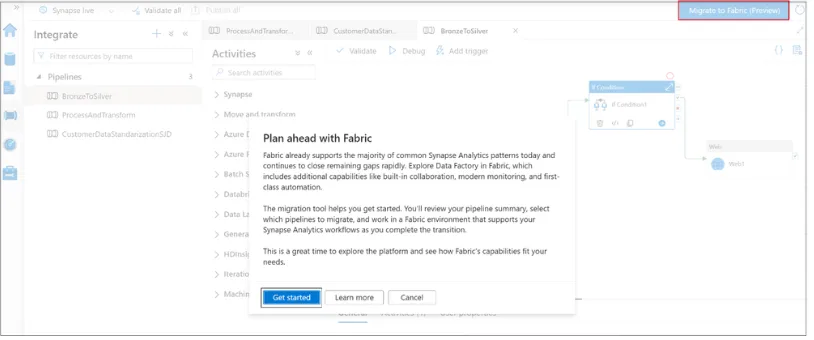
Figure 1. Starting the Synapse pipeline migration assessment. Image: Microsoft Fabric Updates Blog.
The current guidance identifies four outcomes:
| Outcome | Next action |
|---|---|
| Ready | Select for initial migration and testing |
| Needs review | Resolve flagged requirements |
| Coming soon | Reassess when the required support becomes available |
| Not compatible | Refactor or choose another implementation |
“Ready” means ready for upgrade — not proven ready for production. The published screenshot uses “Unsupported” rather than the current guidance’s “Not compatible”.
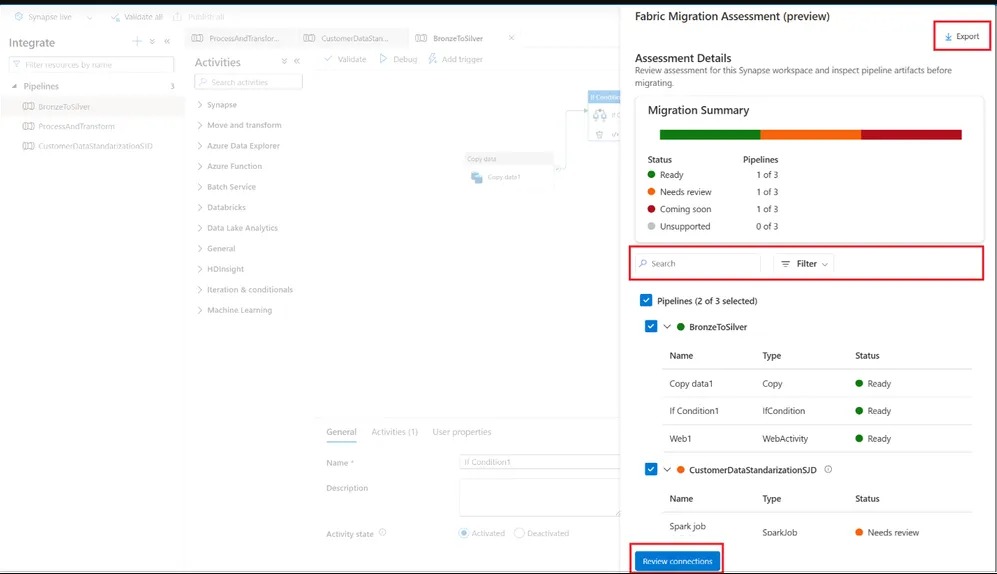
Figure 2. Reviewing pipeline and activity readiness, with the option to export results. Image: Microsoft Fabric Updates Blog.
3. Map connections
Select the destination Fabric workspace and map Synapse linked services to Fabric connections. Check the identity, credentials, permissions and network reachability of each connection.
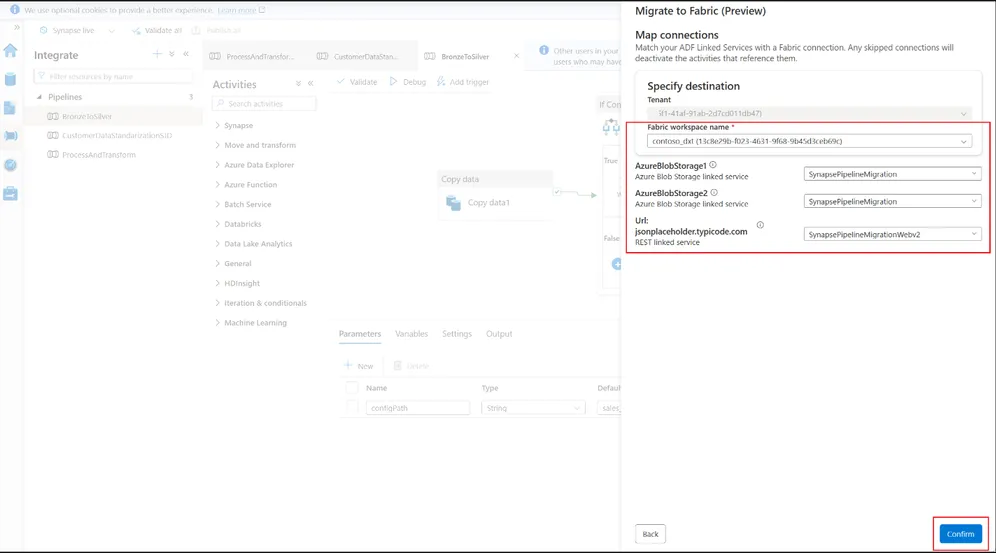
Figure 3. Selecting the destination workspace and mapping linked services to Fabric connections. Image: Microsoft Fabric Updates Blog.
Pipelines can transfer without connection mappings, but activities using those connections remain deactivated until configured and reactivated. A successful transfer is therefore not an executable, validated solution.
4. Test before enabling scheduling
Confirm the upgrade and inspect the resulting pipelines in Fabric. Triggers are disabled by default, allowing execution to remain under explicit control during validation.
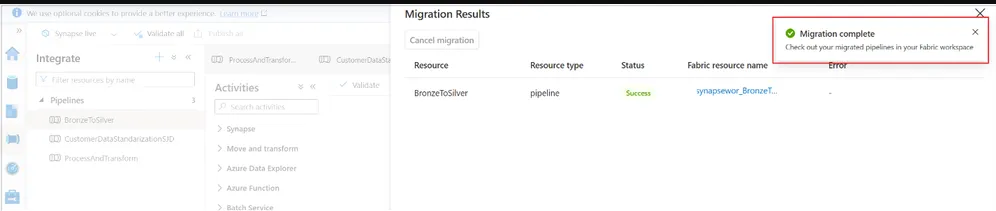
Figure 4. Migration completion confirms the transfer stage, not production acceptance. Image: Microsoft Fabric Updates Blog.
For the sales pilot, agree evidence such as:
- Input, accepted and rejected counts reconcile.
- Revenue totals match the agreed reference.
- Duplicate handling follows the business rule.
- Rerunning a batch does not duplicate transactions.
- Failure alerts and recovery procedures work.
- Runtime and consumption meet agreed targets.
These are illustrative acceptance checks; adapt them to the workload’s business and operational risks.
Keep dedicated SQL pools in a separate workstream
The Warehouse Migration Assistant supports source connections or metadata uploads, schema conversion, remediation of incompatible objects and data copying through Fabric Data Factory.
Review SQL behaviour, security and downstream applications separately. Microsoft documents incomplete T-SQL compatibility and requirements such as replacing SQL-authenticated users with Microsoft Entra identities.
Moving a pipeline does not resolve these warehouse differences.
Cut over when the evidence supports it
Agree the final synchronisation, schedule switch, consumer changes and recovery procedure before cutover.
During parallel validation, prevent both platforms from writing to the same production tables. Microsoft’s planning guidance warns that uncontrolled dual writes can cause duplication and divergence; changes made in Synapse also do not automatically appear in migrated Fabric items.
A migration assistant reduces transfer effort. The production decision still depends on demonstrated results, tested controls and an operating model the team can support.
Documentation reviewed on 22 October 2026. Confirm current availability, preview limitations, permissions and compatibility before planning a production migration.
Sources
- Microsoft Learn: Plan your Synapse Spark migration to Fabric
- Microsoft Learn: Migrate Spark workloads from Azure Synapse Analytics to Microsoft Fabric (preview)
- Microsoft Learn: Migrate Synapse Spark workloads to Fabric
- Microsoft Learn: Upgrade your Azure Synapse Analytics pipelines to Fabric Data Factory (preview)
- Microsoft Fabric Updates Blog: Upgrade your Synapse pipelines to Microsoft Fabric with confidence (Preview)
- Microsoft Learn: Migration Assistant for Fabric Data Warehouse
- Microsoft Learn: Complete Synapse to Fabric migration with security, validation and cutover