Course guide
On this page
By the end of this lesson you can
- Understand what the 30-day course covers and how each day is organised
- Know which software the course uses, and why
- Find your way around the Ridgeway Outdoor practice database
Ridgeway Outdoor training course for Microsoft SQL Server
This guide explains what the course covers, how it is organised, which environment it uses and how the shared training dataset works. Read it once before the one-time setup lesson.
1. What the course covers
The course has 30 daily topics across four weeks.
| Week | Theme | Days |
|---|---|---|
| 1 | Advanced querying foundations — filtering, aggregation, subqueries, CTEs, window functions | 1–7 |
| 2 | Joins, set operations and advanced retrieval — APPLY, PIVOT, dates and temporal tables, strings | 8–14 |
| 3 | Data modification and programmability — DML with OUTPUT and MERGE, transactions, procedures, functions, triggers, error handling | 15–21 |
| 4 | Performance and expert topics — execution plans, indexing, optimisation, partitioning, advanced objects, JSON/XML, dynamic SQL, real-world scenarios and a final assessment | 22–30 |
Days 7, 14 and 21 are review and integration days. Day 30 combines a realistic ETL scenario, performance monitoring and a final project.
What the course can and cannot promise. Completing all 30 lessons will give you a broad, practical command of T-SQL and hands-on exposure to the techniques professional SQL Server developers use. Expertise comes from continued use on real problems over a longer period; the course gives you the foundation and the habits to build it.
2. Prerequisite gaps and how they are resolved
The syllabus assumes some prior SQL: Day 1 starts with advanced SELECT, and JOINs do not appear until Day 8, although several earlier topics need them. Because the course is written for learners with no SQL experience, essential foundations are embedded as short, clearly labelled primers inside the early lessons. No syllabus topic is removed, renamed or moved.
| Gap in the syllabus | Where it is taught | How |
|---|---|---|
| Tables, rows, columns, keys, relationships | Setup lesson and Day 1 | Concepts explained with the Ridgeway Outdoor tables |
| Connecting to SQL Server, choosing the database | Setup lesson, reinforced on Day 1 | Step-by-step SSMS walkthrough, USE RetailLab; and the database drop-down |
Basic SELECT, aliases, WHERE, ORDER BY, DISTINCT |
Day 1, Part 1 | Taught before the advanced filtering the syllabus specifies |
Data types, expressions, NULL, logical operators |
Day 1, Part 1–2 | Needed before CASE and NULL handling |
INNER JOIN |
Day 2 primer (≈20 min) | Day 2’s grouping exercises combine order headers and order lines |
LEFT JOIN and unmatched rows |
Day 3 primer (≈20 min) | Compared directly with NOT EXISTS |
Variables (DECLARE, SET) and batches (GO) |
Day 4 primer | Needed for parameterised examples from Day 4 onwards |
TOP and OFFSET … FETCH |
Day 7 | Introduced during the Week 1 review alongside logical query processing order |
| Full JOIN treatment | Day 8 (syllabus topic) | Row multiplication, unmatched rows, NULLs, filter placement, self and non-equi joins |
| Creating an inline table-valued function | Day 10 primer | APPLY needs one; full treatment on Day 18 |
| Executing dynamic SQL safely | Day 11 primer | Dynamic PIVOT needs it; full treatment on Day 28 |
| Safe modification with transactions | Day 15 primer | Preview-then-change pattern with BEGIN TRAN … ROLLBACK; full treatment on Day 16 |
| Generating large data volumes | Day 22 | Script 05_generate_performance_data.sql, reused on Days 23–25 and 30 |
Primers are short and practical: they teach only what the day’s exercises require and point forward to the full lesson.
3. Technical environment
All lessons are written for exactly one environment.
| Item | Choice |
|---|---|
| Database engine | SQL Server 2025 (17.x), Standard Developer edition — free, licensed for development and testing only |
| Operating system | Windows 10 or Windows 11 (x64), Home, Pro or Enterprise |
| Query editor | SQL Server Management Studio (SSMS) 22 — release 22.11.1 was current when this guide was written (October 2026); any later 22.x release is fine |
| Training database | RetailLab, compatibility level 170, collation Latin1_General_100_CI_AS, simple recovery model |
| Connection | localhost (default instance) with Windows Authentication |
| Hardware | x64 CPU; 8 GB RAM recommended (4 GB is the documented recommendation for SQL Server itself); about 6 GB free on the system drive for installation plus about 3 GB for the training data, including the larger Week 4 data set |
| Language of the course | British English; the business is a UK retailer with prices in GBP |
Why Standard Developer? SQL Server 2025 offers two free developer editions. Enterprise Developer contains every Enterprise feature; Standard Developer contains the Standard feature set. Microsoft’s installation requirements list Windows 10 and 11 as supported operating systems for Standard and Express, not Enterprise, so Standard Developer is the safer choice for a laptop or desktop. Every syllabus topic is available in it, including table partitioning, system-versioned temporal tables and columnstore indexes. A few Enterprise-only options, such as online index rebuilds, are mentioned in Week 4 but never required.
Why not Express? Express would run most lessons, but its memory and CPU caps make the Week 4 performance exercises less representative. If you cannot install Standard Developer, Express is an acceptable fallback; the lessons note where results may differ.
Why not Azure SQL Database or Microsoft Fabric? The syllabus includes features whose availability differs across Microsoft’s SQL platforms — for example, USE to switch database, cross-database names, filegroups for partitioning, SQL Server Agent and trigger support. Rather than maintaining parallel instructions, the course uses one local SQL Server instance. If you later work in Azure SQL Database, a Fabric Warehouse or a Lakehouse SQL analytics endpoint, check that platform’s T-SQL surface-area documentation before assuming a feature from this course is available there.
Fixed reference date. The data runs from 1 January 2024 to 31 December 2025. Lessons treat 31 December 2025 as “today” and use that literal date rather than GETDATE(), so your results match the published answers whenever you take the course.
Permissions. On a personal installation, the Windows account that installs SQL Server is a member of the sysadmin server role, which covers every lesson. Lessons that touch server-level information (for example, dynamic management views on Day 30) explain which permission is actually needed, so you can apply least privilege at work.
4. Lesson map
Times assume roughly 2–3 hours a day. Essential covers the theory, worked examples, guided lab, independent practice and knowledge check. Stretch is optional.
| Day | Syllabus topic → lesson | Syllabus key concepts covered | Foundations or primers added | Essential | Stretch | Starting state |
|---|---|---|---|---|---|---|
| 0 | One-time setup | — | Install, connect, build RetailLab |
1 h 15 | — | Scripts 00–03 |
| 1 | Advanced SELECT & Filtering | Complex WHERE, CASE, NULL handling |
Relational concepts, SELECT, aliases, WHERE, ORDER BY, DISTINCT, data types, expressions, logical operators |
2 h 45 | 30 min | Core |
| 2 | Aggregate Functions & GROUP BY | Aggregation, HAVING, GROUPING SETS, ROLLUP, CUBE |
INNER JOIN primer |
2 h 30 | 30 min | Core |
| 3 | Subqueries & Derived Tables | Correlated subqueries, EXISTS, IN, derived tables |
LEFT JOIN primer |
2 h 30 | 30 min | Core |
| 4 | Common Table Expressions | Simple, multiple and recursive CTEs | Variables and batches primer | 2 h 30 | 30 min | Core |
| 5 | Window Functions Part 1 | ROW_NUMBER, RANK, DENSE_RANK, NTILE, ties, partitioning |
— | 2 h 30 | 30 min | Core |
| 6 | Window Functions Part 2 | LAG, LEAD, FIRST_VALUE, LAST_VALUE, running aggregates, explicit ROWS/RANGE frames |
— | 2 h 45 | 30 min | Core |
| 7 | Week 1 Review & Integration | All Week 1 concepts | Logical processing order, TOP, OFFSET … FETCH |
2 h 30 | 45 min | Core |
| 8 | Advanced JOIN Techniques | Inner, left, right, full outer, cross, self and non-equi joins | Row multiplication, filter placement, NULL behaviour |
2 h 45 | 30 min | Core |
| 9 | Set Operations | UNION, UNION ALL, INTERSECT, EXCEPT |
— | 2 h 15 | 30 min | Core |
| 10 | APPLY Operator | CROSS APPLY, OUTER APPLY, table-valued functions |
Inline TVF primer | 2 h 30 | 30 min | Core |
| 11 | PIVOT & UNPIVOT | Static and dynamic pivoting, unpivoting | Dynamic SQL primer | 2 h 45 | 30 min | Core |
| 12 | Temporal Tables & Time-Based Queries | DATEPART, DATEADD, DATEDIFF, ranges, calendar tables, system-versioned temporal tables |
Distinguishes date arithmetic from temporal tables | 3 h | 30 min | Core + day 12 script |
| 13 | STRING Functions & Pattern Matching | LIKE, PATINDEX, STRING_SPLIT, STRING_AGG, CONCAT |
— | 2 h 30 | 30 min | Core |
| 14 | Week 2 Review & Complex Queries | All Week 2 concepts | — | 2 h 30 | 45 min | Core + day 12 script |
| 15 | Advanced INSERT, UPDATE, DELETE | OUTPUT, MERGE, table variables, MERGE limitations and alternatives |
Safe-modification primer | 2 h 45 | 30 min | Core |
| 16 | Transactions & Concurrency | Transactions, isolation levels, locking, blocking, deadlocks | Two-session (Session A / Session B) labs | 3 h | 30 min | Core |
| 17 | Stored Procedures | Parameters, return values, output parameters, dynamic SQL in procedures | — | 2 h 45 | 30 min | Core |
| 18 | User-Defined Functions | Scalar, inline and multi-statement table-valued functions | — | 2 h 30 | 30 min | Core |
| 19 | Triggers | AFTER and INSTEAD OF, inserted/deleted, multi-row logic |
— | 2 h 30 | 30 min | Core + day 19 script |
| 20 | Error Handling & Debugging | TRY…CATCH, THROW, RAISERROR, error functions, XACT_STATE() |
— | 2 h 45 | 30 min | Core |
| 21 | Week 3 Review & Integration | A complete CRUD system with auditing and error handling | — | 3 h | 45 min | Core |
| 22 | Query Execution Plans | Estimated vs actual plans, operators, statistics, logical reads | Large-data generation | 3 h | 30 min | Core + script 05 |
| 23 | Indexing Strategies | Clustered, nonclustered, covering, included columns, filtered indexes, maintenance | — | 3 h | 30 min | Core + script 05 |
| 24 | Query Optimisation Techniques | Sargability, implicit conversions, parameter sniffing, hints | — | 3 h | 30 min | Core + script 05 |
| 25 | Partitioning | Partition functions and schemes, boundaries, elimination, sliding window | — | 2 h 45 | 30 min | Core + script 05 |
| 26 | Advanced T-SQL Features | Sequences, synonyms, schemas, computed and persisted columns | — | 2 h 30 | 30 min | Core |
| 27 | JSON & XML in T-SQL | FOR JSON, OPENJSON, JSON_VALUE, FOR XML, XQuery methods |
— | 2 h 45 | 30 min | Core + day 27 script |
| 28 | Dynamic SQL & Metaprogramming | sp_executesql, parameterisation, identifier validation, QUOTENAME, injection prevention |
— | 2 h 45 | 30 min | Core |
| 29 | Real-World Scenarios Part 1 | Gaps and islands, running balances, complex business questions | — | 3 h | 45 min | Core + day 29 script |
| 30 | Real-World Scenarios Part 2 & Final Assessment | ETL from staging, slowly changing dimension (Type 2), DMV-based monitoring, final project with rubric | — | 3 h | 1 h | Core + day 30 script |
Starting state “Core” means the database as built by scripts 00–02. Day-specific scripts are delivered with the lesson that first needs them.
5. The dataset: Ridgeway Outdoor
5.1 The business
Ridgeway Outdoor is a fictional UK retailer of camping, clothing and navigation gear. It sells online and through three shops (London, Manchester and, since September 2024, Edinburgh), ships from two warehouses and has customers across the UK, Ireland and Europe. The core data covers two trading years, 2024 and 2025.
All people, companies, email addresses and phone numbers are invented. Email addresses use reserved example domains.
5.2 Why one synthetic dataset
A single, coherent dataset means you learn one schema well and every new technique is applied to familiar data. It is designed around all 30 lessons: small enough on Day 1 to read every row of a table, with a separate generator for millions of rows when Week 4 needs them. Every core value is written as a literal in the load script, so every learner gets identical rows, identical results and identical answers.
No external download is needed for any lesson. If a later lesson ever uses one, it will follow the verification rules in section 7.
5.3 Schema overview
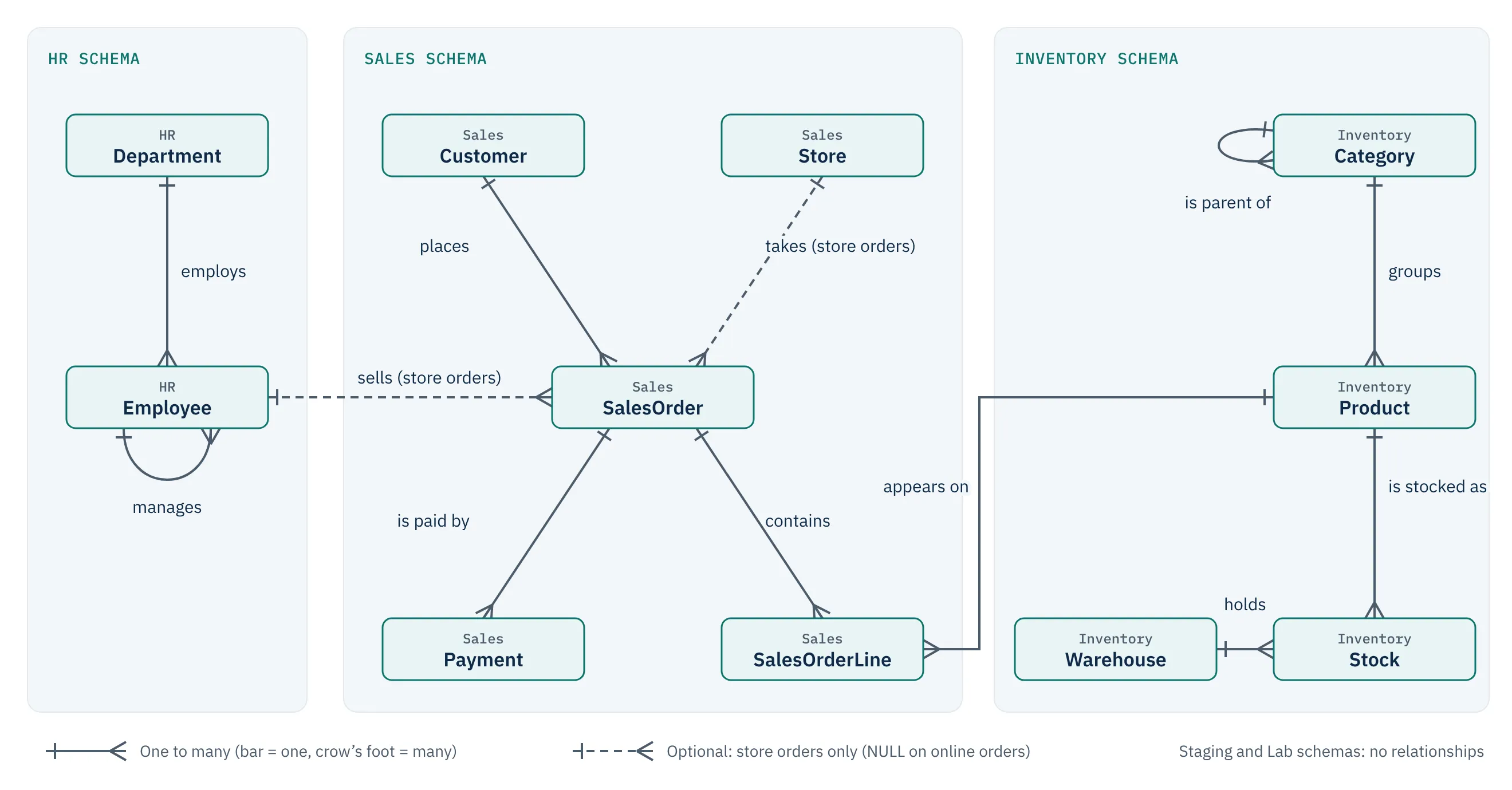
Figure 1. The Ridgeway Outdoor core schema. Each line is a one-to-many relationship; dashed lines apply to store orders only.
The same relationships in plain words:
- Each employee belongs to one department and may report to one manager, who is another employee.
- Each order is placed by one customer. A store order also records the store and the employee who served the customer; an online order has neither.
- Each order has one or more order lines; each line is for one product.
- An order may have zero, one or several payments.
- Categories form a three-level tree (for example Clothing → Jackets → Waterproof Jackets). Each product belongs to one category.
- Stock records how many units of a product each warehouse holds.
- Staging tables hold raw imported data with no relationships enforced.
5.4 Schemas
| Schema | Purpose |
|---|---|
HR |
Departments and employees |
Sales |
Customers, stores, orders, order lines, payments |
Inventory |
Categories, products, warehouses, stock |
Staging |
Raw imports awaiting cleansing; deliberately unconstrained |
Lab |
Empty at start. Your practice objects go here so they never collide with the core tables |
Perf |
Created on Day 22 for the large performance dataset |
5.5 Data dictionary
HR.Department — 6 rows
| Column | Type | Null? | Notes |
|---|---|---|---|
| DepartmentID | int | No | Primary key |
| DepartmentName | nvarchar(50) | No | Unique. Marketing has no employees (useful for outer joins) |
HR.Employee — 16 rows
| Column | Type | Null? | Notes |
|---|---|---|---|
| EmployeeID | int | No | Primary key |
| FirstName, LastName | nvarchar(50) | No | |
| JobTitle | nvarchar(60) | No | |
| DepartmentID | int | No | → HR.Department |
| ManagerID | int | Yes | → HR.Employee. NULL only for the Managing Director. Hierarchy is four levels deep |
| varchar(100) | No | Unique | |
| HireDate | date | No | |
| TerminationDate | date | Yes | NULL = still employed. One leaver (James Reid, 30 June 2025) |
| Salary | decimal(10,2) | No | Annual GBP. Four pairs of tied salaries for ranking exercises |
Sales.Store — 3 rows
| Column | Type | Null? | Notes |
|---|---|---|---|
| StoreID | int | No | Primary key |
| StoreName | nvarchar(60) | No | Unique |
| City, Country | nvarchar(60) | No | |
| OpenedDate | date | No | Edinburgh opened 2024-09-01, so it has no earlier orders |
Sales.Customer — 40 rows
| Column | Type | Null? | Notes |
|---|---|---|---|
| CustomerID | int | No | Primary key |
| FirstName, LastName | nvarchar(50) | No | Includes accented names such as Zoë, Søren and François |
| nvarchar(255) | Yes | 4 NULLs. Unique when present (filtered unique index) | |
| Phone | varchar(30) | Yes | 10 NULLs. International format |
| City, Country | nvarchar(60) | No | 9 countries |
| CustomerSegment | varchar(10) | No | Consumer, Business or VIP |
| DateJoined | date | No | |
| IsActive | bit | No | 3 inactive customers. Customers 36–40 have never ordered |
Inventory.Category — 15 rows
| Column | Type | Null? | Notes |
|---|---|---|---|
| CategoryID | int | No | Primary key |
| CategoryName | nvarchar(50) | No | Unique |
| ParentCategoryID | int | Yes | → Inventory.Category. NULL for the three top-level categories. Hydration has no products |
Inventory.Product — 30 rows
| Column | Type | Null? | Notes |
|---|---|---|---|
| ProductID | int | No | Primary key |
| ProductCode | varchar(20) | No | Unique business key, e.g. TNT-001 |
| ProductName | nvarchar(100) | No | Not unique: some products come in several colours or sizes |
| CategoryID | int | No | → Inventory.Category (always a lowest-level category) |
| ListPrice, StandardCost | decimal(10,2) | No | GBP. Several tied list prices |
| Colour | nvarchar(20) | Yes | NULL where colour does not apply |
| Size | nvarchar(10) | Yes | Clothing and footwear sizes |
| WeightKg | decimal(6,2) | Yes | Populated for all products at start |
| LaunchDate | date | No | |
| DiscontinuedDate | date | Yes | Only the Classic Canvas Bell Tent (31 Dec 2024) |
| Tags | nvarchar(200) | Yes | Comma-separated keywords for Day 13 |
Inventory.Warehouse — 2 rows; Inventory.Stock — 49 rows
| Column | Type | Null? | Notes |
|---|---|---|---|
| WarehouseID | int | No | Primary key of Warehouse; part of Stock’s key |
| WarehouseName, City | nvarchar(60) | No | |
| ProductID | int | No | Part of Stock’s composite key (WarehouseID, ProductID) |
| QuantityOnHand | int | No | Never negative (CHECK constraint) |
| ReorderLevel | int | No |
Sales.SalesOrder — 376 rows
| Column | Type | Null? | Notes |
|---|---|---|---|
| OrderID | int | No | Primary key, 1001–1376 |
| CustomerID | int | No | → Sales.Customer |
| SalesChannel | varchar(10) | No | Online or Store |
| StoreID | int | Yes | → Sales.Store. Required for store orders, NULL for online orders (CHECK constraint) |
| EmployeeID | int | Yes | → HR.Employee. The salesperson on store orders; NULL online |
| OrderDate | date | No | 2024-01-01 to 2025-12-31. No orders 2025-08-11 to 2025-08-17 (date-gap case) |
| ShippedDate | date | Yes | NULL when pending or cancelled. Store orders: same day |
| OrderStatus | varchar(10) | No | Pending, Shipped, Delivered, Cancelled |
| ShippingCost | decimal(10,2) | No | £4.95 on online orders under £50, otherwise 0 |
| Notes | nvarchar(400) | Yes | Mostly NULL |
Sales.SalesOrderLine — 702 rows
| Column | Type | Null? | Notes |
|---|---|---|---|
| OrderLineID | int | No | Primary key |
| OrderID | int | No | → Sales.SalesOrder |
| ProductID | int | No | → Inventory.Product. Unique per order |
| Quantity | int | No | Greater than 0 |
| UnitPrice | decimal(10,2) | No | Price charged (equals list price in the core data) |
| DiscountPct | decimal(4,2) | No | 0.00–0.50. Business 5%, VIP 10%, Black Friday week 15% |
Line amount = Quantity * UnitPrice * (1 - DiscountPct). Order amount due = the line amounts rounded to 2 decimal places, plus ShippingCost.
Sales.Payment — 395 rows
| Column | Type | Null? | Notes |
|---|---|---|---|
| PaymentID | int | No | Primary key |
| OrderID | int | No | → Sales.SalesOrder. 29 orders are split across two payments |
| PaymentDate | date | No | Bank transfers arrive 3–14 days after the order |
| Amount | decimal(10,2) | No | Greater than 0 |
| PaymentMethod | varchar(20) | No | Card, PayPal, Gift Card, Bank Transfer |
Cancelled orders (7) have no payments; 5 further orders are not yet paid.
Staging.CustomerImport — 15 rows, Staging.ProductPriceUpdate — 10 rows
Raw text from external systems, used on Days 9, 13, 15 and 30. They deliberately contain duplicate people with different spacing and capitalisation, invalid emails, blank and NULL names, records matching existing customers, unknown product codes, non-numeric and negative prices, and two conflicting prices for one product. Keeping these problems in staging lets the core tables keep their constraints.
5.6 Built-in teaching cases
| Case | Where to find it |
|---|---|
| NULLs with different meanings | Customer.Email/Phone (unknown), SalesOrder.StoreID/EmployeeID (not applicable), ShippedDate (not yet happened), Employee.ManagerID (top of hierarchy) |
| Ties | Employee salaries; product list prices (£189.00, £349.00, £299.00 and others) |
| Rows without matches | 5 customers with no orders; product 29 never sold; Marketing department with no employees; Hydration category with no products |
| Date gaps | No orders 11–17 August 2025; Edinburgh store has no orders before September 2024 |
| Duplicates | Staging.CustomerImport (same person entered three ways) |
| Hierarchies | Employee → manager (4 levels); category → parent (3 levels) |
| Partial payment patterns | Split payments; unpaid orders; late bank transfers |
5.7 Expected sizes and resources
| Data set | Rows | Approximate size | When |
|---|---|---|---|
| Core data | 1,659 rows across 13 tables | Under 20 MB including log | From Day 1 |
Performance data (Perf schema) |
Planned: about 1 million orders and 3 million order lines; exact counts are published with the Day 22 script | About 1–2 GB including log | Days 22–25 and 30 |
The performance generator will be sized so that it runs in a few minutes on a typical laptop with 8 GB RAM, and it can be dropped again after Week 4.
6. Scripts, naming and reset strategy
6.1 Folder layout
Download the setup scripts as one zip file, or one at a time from the setup lesson. Lesson scripts are published with the lessons that need them.
scripts/
  setup/
    00_create_database.sql          DESTRUCTIVE: drops and re-creates RetailLab
    01_create_tables.sql            schemas, tables, constraints
    02_load_core_data.sql           deterministic core data (one transaction)
    03_validate_core_data.sql       25 read-only checks; all should PASS
    04_reset_training_data.sql      DESTRUCTIVE: runs 00-03 in SQLCMD Mode
    05_generate_performance_data.sql   delivered with Day 22
  lessons/
    dayNN_<purpose>.sql             delivered with each lesson that needs extra objects
6.2 Rules every lesson follows
- Starting state is always reproducible. Every lesson states its starting state. To reach it you never need to have completed earlier lessons: run
04_reset_training_data.sql(or scripts 00–03), then the lesson’s ownlessons/dayNN_….sqlscript if it has one. - Core tables are read-only unless a lesson says otherwise. Lessons that modify data (from Day 15) work inside transactions you roll back, or on copies in the
Labschema, and tell you exactly how to restore the core data. - Your objects go in
Lab. Tables, views, procedures and functions you create are namedLab.<Name>. Each lesson’s cleanup section lists what to drop and what to keep. - Destructive scripts are labelled
*** DESTRUCTIVE ***in their header and affect onlyRetailLab. - Names are stable. Table and column names in this guide never change during the course.
6.3 When to reset
- Before any lesson whose starting state you are unsure of.
- If
03_validate_core_data.sqlreports aFAIL. - After Day 25, if disk space is tight, drop the
Perfschema objects (Day 25’s cleanup shows how) and restore them with script 05 before Day 30.
7. Conventions
- Dialect. T-SQL for SQL Server 2025 only. No PostgreSQL, MySQL or ANSI-only variants.
- Style. Keywords in upper case; schema-qualified object names (
Sales.Customer, never justCustomer); every statement ends with a semicolon. - Ordering. Whenever row order matters, queries use
ORDER BYwith a unique tie-breaker (usually the primary key). WithoutORDER BY, SQL Server does not guarantee any order. - Dates. Literal dates use the unambiguous
'YYYY-MM-DD'format. - Solutions are always in a separate section after the practice tasks, hidden behind a “Show solution” control.
- External datasets. None are needed. Should one ever be introduced, it will come with a verified publisher, source page, licence, size, restore steps and the exact tables used.
8. How the material was checked
The scripts and lesson queries have been reviewed against the SQL Server 2025 documentation and run on SQL Server 2025. 03_validate_core_data.sql lets you confirm on your own machine that your data matches the published figures. If any script or result differs on your machine, treat it as a course defect and report it to hello@dataplusai.dev.